Comtech-ef-data OM20 Bedienungsanleitung Seite 109
- Seite / 220
- Inhaltsverzeichnis
- FEHLERBEHEBUNG
- LESEZEICHEN

- Universal Outdoor Modem 1
- Table of Contents 5
- PREFACE 11
- Cautions and Warnings 12
- Trademarks 12
- Safety Compliance 13
- EN 60950 13
- Low Voltage Directive (LVD) 13
- Warranty Policy 14
- Limitations of Warranty 14
- Exclusive Remedies 15
- Customer Support 16
- Online Customer Support 16
- Chapter 1. Introduction 17
- 1.1 OM20 Configurations 18
- MN-OM20– Revision 5 1–4 20
- Chapter 2. Installation 21
- 2.2 Unpacking 22
- 2.2.1 Outdoor Modem (OM20) 22
- 2.3 Removal and Assembly 23
- MN-OM20– Revision 5 2–4 24
- MN-OM20– Revision 5 2–5 25
- MN-OM20– Revision 5 2–6 26
- MN-OM20– Revision 5 2–7 27
- MN-OM20– Revision 5 2–8 28
- MN-OM20– Revision 5 2–9 29
- MN-OM20– Revision 5 2–10 30
- MN-OM20– Revision 5 2–11 31
- MN-OM20– Revision 5 2–12 32
- MN-OM20– Revision 5 3–1 33
- IP M&C Default Reset 34
- MN-OM20– Revision 5 3–3 35
- MN-OM20– Revision 5 3–4 36
- 3.4 Storage and Reshipment 37
- MN-OM20– Revision 5 3–6 38
- 4.1 OM20 Hardware 39
- MN-OM20– Revision 5 4–2 40
- 4.2.1 Baseband Processing 42
- MN-OM20– Revision 5 4–5 43
- 4.3.1 Terminal Port 45
- 4.3.3 Ethernet M&C Port 45
- 4.3.4 Modem Monitor Status 46
- 4.5 Internal Clock 46
- MN-OM20– Revision 5 4–10 48
- MN-OM20– Revision 5 4–11 49
- 4.7 Clocking Options 50
- 4.7.1 TX Clock Options 50
- 4.7.2.1 RX SAT Clock 52
- 4.7.2.4 EXT CLK/EXT BNC: 52
- MN-OM20– Revision 5 4–15 53
- 4.9 Reed-Solomon Codec 54
- 4.9.3 Interleaving 54
- MN-OM20– Revision 5 4–17 55
- MN-OM20– Revision 5 4–18 56
- 4.13 Standard IBS Mode 57
- MN-OM20– Revision 5 4–20 58
- 4.15 ESC Backward Alarms 59
- 4.16.1 SCC Framing Structure 60
- 4.16.2 Aggregate Data Rate 61
- MN-OM20– Revision 5 4–24 62
- MN-OM20– Revision 5 4–25 63
- MN-OM20– Revision 5 4–26 64
- 4.19 Strap Codes 65
- MN-OM20– Revision 5 4–28 66
- MN-OM20– Revision 5 5–1 67
- MN-OM20– Revision 5 5–2 68
- 5.1.1 Power Input 69
- MN-OM20– Revision 5 5–4 70
- Balanced Data I/O Port (J3) 71
- 5.1.5 Ground Lug (J6) 73
- 5.1.6 RX L-Band IF (J7) 73
- 5.1.7 TX L-Band IF (J8) 73
- MN-OM20– Revision 5 5–8 74
- Protocol 75
- 6.2.1 Appearance 76
- 6.2.2 Navigation 77
- 6.2.3 LED Indicators 78
- 6.3 GUI Screen Menus 79
- 6.3.1 Introduction Menu 80
- 6.3.1.1 Login Screen 81
- 6.3.2 Password Setup 82
- MN-OM20– Revision 5 6–9 83
- 6.3.3.1 Modem Addressing 84
- MN-OM20– Revision 5 6–11 85
- MN-OM20– Revision 5 6–12 86
- Table 6-5. SNMP Parameters 87
- MN-OM20– Revision 5 6–14 88
- MN-OM20– Revision 5 6–15 89
- 6.3.4.1 Transmit Menu 90
- MN-OM20– Revision 5 6–17 91
- MN-OM20– Revision 5 6–18 92
- MN-OM20– Revision 5 6–19 93
- MN-OM20– Revision 5 6–20 94
- MN-OM20– Revision 5 6–21 95
- MN-OM20– Revision 5 6–22 96
- MN-OM20– Revision 5 6–24 98
- MN-OM20– Revision 5 6–25 99
- MN-OM20– Revision 5 6–26 100
- MN-OM20– Revision 5 6–27 101
- IM PO RTA NT 102
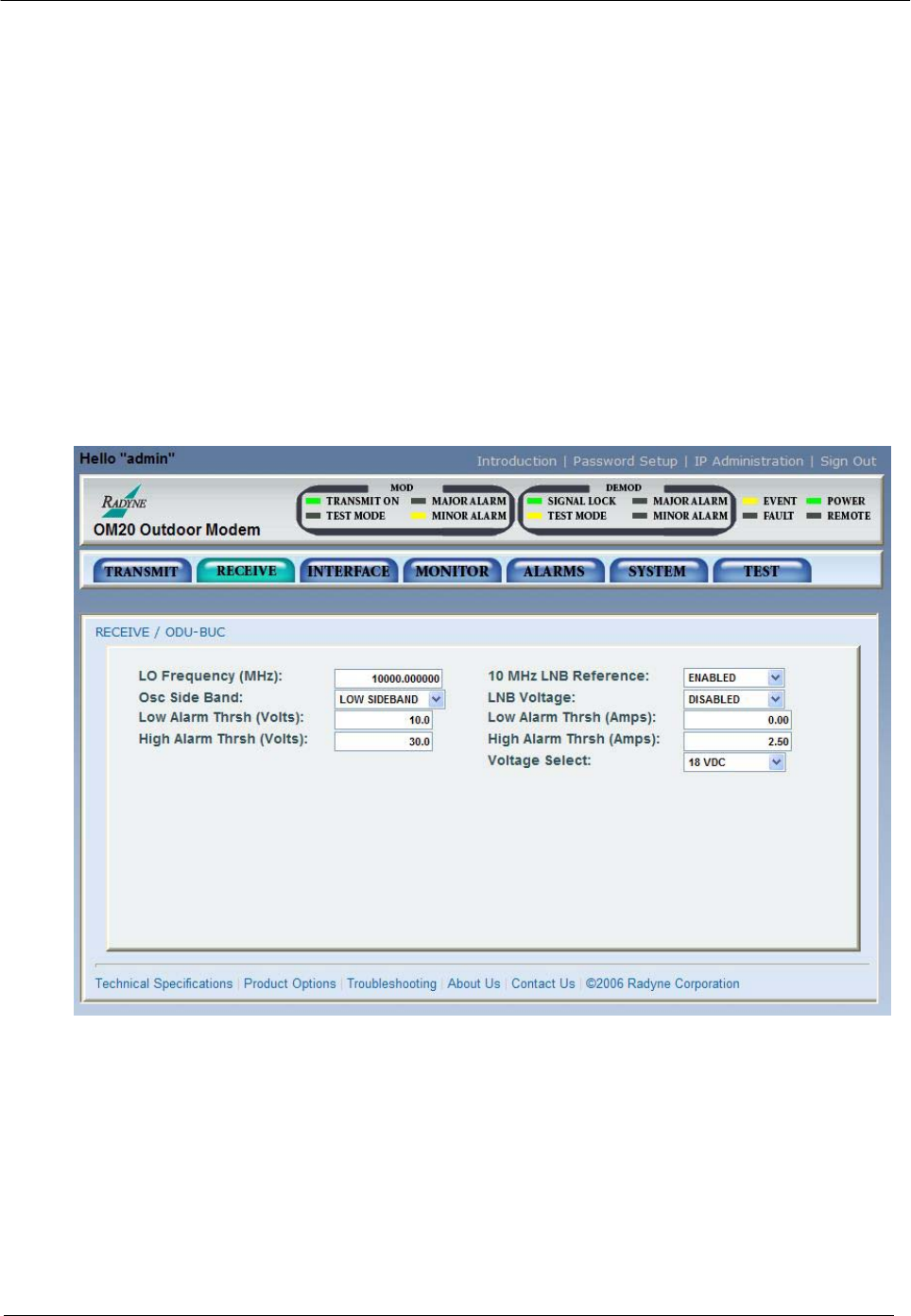
- 6.3.4.2 Receive Menu 103
- MN-OM20– Revision 5 6–30 104
- MN-OM20– Revision 5 6–31 105
- MN-OM20– Revision 5 6–32 106
- MN-OM20– Revision 5 6–33 107
- MN-OM20– Revision 5 6–34 108
- MN-OM20– Revision 5 6–35 109
- MN-OM20– Revision 5 6–36 110
- 6.3.4.3 Interface Menu 111
- MN-OM20– Revision 5 6–38 112
- MN-OM20– Revision 5 6–39 113
- MN-OM20– Revision 5 6–40 114
- MN-OM20– Revision 5 6–41 115
- MN-OM20– Revision 5 6–42 116
- MN-OM20– Revision 5 6–43 117
- 6.3.4.4 Monitor Menu 118
- MN-OM20– Revision 5 6–45 119
- MN-OM20– Revision 5 6–46 120
- MN-OM20– Revision 5 6–47 121
- MN-OM20– Revision 5 6–48 122
- 6.3.4.5 Alarms Menu 123
- MN-OM20– Revision 5 6–50 124
- MN-OM20– Revision 5 6–51 125
- MN-OM20– Revision 5 6–52 126
- MN-OM20– Revision 5 6–53 127
- MN-OM20– Revision 5 6–54 128
- MN-OM20– Revision 5 6–55 129
- 6.3.4.6 System Menu 130
- MN-OM20– Revision 5 6–57 131
- MN-OM20– Revision 5 6–58 132
- 6.3.4.7 Test Menu 133
- 6.4.1 Ethernet Flow Control 134
- 6.4.2 Packet Statistics 135
- 6.5 Terminal Mode Control 136
- MN-OM20– Revision 5 6–63 137
- MN-OM20– Revision 5 6–64 138
- Chapter 7. Maintenance and 139
- Troubleshooting 139
- 7.2.1 Alarm Faults 140
- 7.2.1.1 Major Tx Alarms 140
- 7.2.1.2 Major Rx Alarms 141
- 7.2.1.3 Minor Tx Alarms 141
- 7.2.1.4 Minor Rx Alarms 142
- 7.2.2 Alarm Masks 143
- 7.2.2.1 Active Alarms 144
- 7.2.2.1.1 Major Alarms 144
- 7.2.2.1.2 Minor Alarms 144
- 7.2.2.2 Latched Alarms 144
- 8.1 Data Rates 145
- 8.2 Modulator 145
- 8.3 Demodulator 146
- 8.4 Plesiochronous Buffer 146
- 8.5 Monitor and Control 146
- MN-OM20– Revision 5 8–3 147
- MN-OM20– Revision 5 8–4 148
- 8.12.2 DVB 149
- MN-OM20– Revision 5 8–6 150
- Viterbi 151
- 151
- Sequential 152
- Viterbi Decoder 153
- Reed Solomon 153
- Trellis 154
- Viterbi Decoder 156
- Turbo Decoder 157
- MN-OM20– Revision 5 8–16 160
- MN-OM20– Revision 5 8–17 161
- MN-OM20– Revision 5 8–18 162
- 8.13.10 Input Level 163
- MN-OM20– Revision 5 8–20 164
- Appendix A. Product Options 165
- A.2 Customized Options 166
- Procedure 167
- MN-OM20– Revision 5 B–2 168
- B.4 Demonstration Procedure 169
- MN-OM20– Revision 5 B–4 170
- B.7 Monitor and Control 171
- MN-OM20– Revision 5 B–6 172
- Appendix C. Carrier Control 173
- C.4 Carrier Auto 174
- C.5 Carrier VSat 174
- C.6 Carrier RTS 174
- D.2 Required Items 175
- D.1 Introduction 175
- MN-OM20– Revision 5 D–2 176
- MN-OM20– Revision 5 D–3 177
- D.4.1 Configuring the modem 178
- MN-OM20– Revision 5 D–5 179
- MN-OM20– Revision 5 D–6 180
- MN-OM20– Revision 5 D–7 181
- MN-OM20– Revision 5 D–8 182
- MN-OM20– Revision 5 E–1 183
- E.2 Drop Only 184
- E.3 Insert Only 184
- E.4 Mode Selection 185
- E.4.1 PCM-30 185
- E.4.2 PCM-30C 185
- E.4.3 PCM-31 186
- E.4.4 PCM-31C 186
- E.4.5 T1-D4/T1-D4-S 186
- E.4.6 T1-ESF/T1-ESF-S 186
- E.6 Drop and Insert Mapping 187
- MN-OM20– Revision 5 E–6 188
- E.7.1 Data Rate 189
- MN-OM20– Revision 5 E–8 190
- MN-OM20– Revision 5 E–9 191
- MN-OM20– Revision 5 E–10 192
- MN-OM20– Revision 5 E–11 193
- MN-OM20– Revision 5 E–12 194
- MN-OM20– Revision 5 E–13 195
- MN-OM20– Revision 5 E–14 196
- MN-OM20– Revision 5 E–15 197
- MN-OM20– Revision 5 E–16 198
- Appendix F. Efficient 199
- Drop & Insert (D&I) 199
- MN-OM20– Revision 5 F–2 200
- MN-OM20– Revision 5 F–3 201
- Overhead 202
- MN-OM20– Revision 5 F–5 203
- MN-OM20– Revision 5 F–6 204
- Appendix G. Strap Codes 205
- G.2 Sample Applications 209
- MN-OM20– Revision 5 G–6 210
- MN-OM20– Revision 5 G–7 211
- MN-OM20– Revision 5 G–8 212
- MN-OM20– Revision 5 G–9 213
- MN-OM20– Revision 5 G–10 214
- Appendix H. AUPC Operations 215
- H.1.2 EF AUPC 216
- H.1.3 Near Side AUPC 216
- MN-OM20– Revision 5 H–3 217
- MN-OM20– Revision 5 H–4 218
- METRIC CONVERSIONS 219
- Units of Length 219
- Temperature Conversions 219
- Units of Weight 219
- 480 • 333 • 2200 PHONE 220
- • 333 • 2161 FAX 220
Verwandte Produkte und Handbücher für Ausrüstung Comtech-ef-data OM20
 (192 Seiten)
(212 Seiten)
(192 Seiten)
(212 Seiten)
© 2020, manymanuals.de. Alle Rechte vorbehalten. | 0.069 s |
 Manymanuals.com
 Manymanuals.de
 Manymanuals.fr
 Manymanuals.it
 Manymanuals.pl
 Manymanuals.cz
 Manymanuals.es
 Manymanuals-pt.com
Kommentare zu diesen Handbüchern