Comtech-ef-data CiLink Bedienungsanleitung Seite 33

  • Herunterladen
  • Zu meinen Handbüchern hinzufügen
  • Drucken
  • Seite
    / 38
  • Inhaltsverzeichnis
  • LESEZEICHEN
  • Bewertet. / 5. Basierend auf Kundenbewertungen
Seitenansicht 32
CSAT-5060/XSAT-7080 Transceiver iPAQ Link Revision 2
Operations MN/CiLink.IOM
3–11
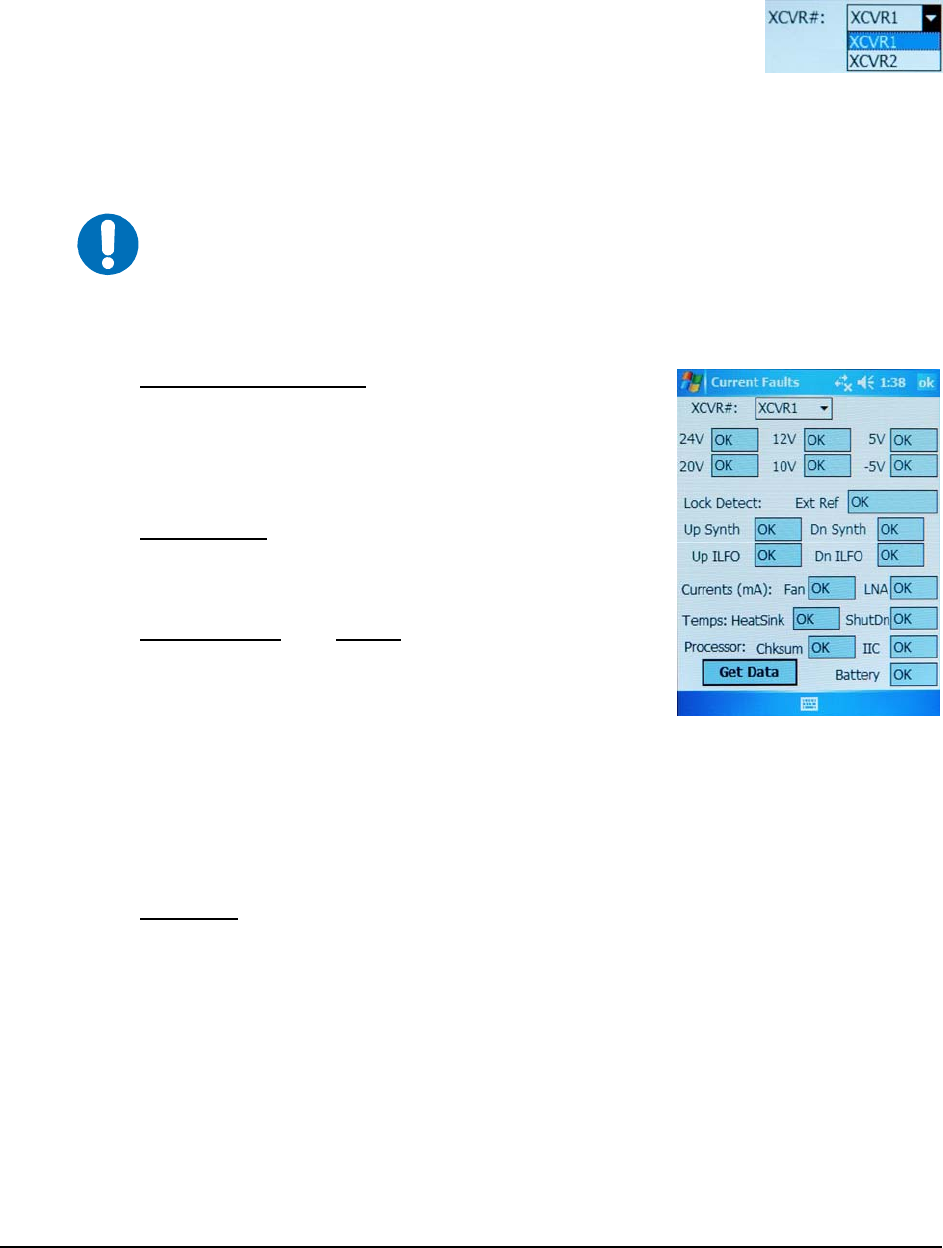
3.3.4 Main Menu Æ Current Fault Status
The currently selected transceiver is the unit that will be polled for status
information in the
Current Fault Status XCVR# selection box:
XCVR1 is the default selection and XCVR2 is not selectable if CiLink is set to operate under
standalone (non-redundant) system parameters (see
Configuration Æ System Type for detailed
information).
XCVR Internal Voltages – The transceiver unit monitors
the six internal DC voltages: 24, 20, 12, 10, +5 and –5 for
the currently selected transceiver. The monitor circuitry
will display a fault if any of these voltages are ±10% out
of range.
Lock Detects – The transceiver monitors the four phase
lock loops (PLLs) for each transceiver. A fault is
displayed for any and each PLL that is not locked.
Currents (mA) and Temps – The Fan and LNA are
monitored for excessive and low currents. A fault is
displayed if these currents are out of their prescribed
window.
If the temperature rises out of specification for the transceiver, a fault will appear in the
HeatSink field.
As the heat sink temperature continues to rise, the transceiver will automatically disable
the FET amplifiers and display a
ShutDn (shutdown) fault.
Processor – The Chksum (checksum), IIC Bus, and Battery are monitored for proper
operation and will display a faulted condition when the processor system is not
functioning properly.
Tap
[Get Data] to query the selected transceiver and refresh the information parameters.
Otherwise, tap
[ok] to return to the Main Menu from the Current Fault Status screen.
IMPORTANT
The information provided on the Current Fault Status screen furnishes
information on a status only basis. All information furnished on this screen is
refreshed each time the Current Fault Status screen is selected, if the currently
selected transceiver is changed, or if the
[Get Data] icon is selected.
Each shaded status window on this screen displays the parameter’s active status as
operating either within operational limits [OK] or in faulted conditions [FT].
Seitenansicht 32
1 2 ... 28 29 30 31 32 33 34 35 36 37 38

Kommentare zu diesen Handbüchern

Keine Kommentare